

I'm currently taking some time off my job and have used some of that to deal with programs that I'm interested in. One of those is Easy Effects, which is an audio mixer that can be used as an always-on microphone optimizer.
My microphone is a Tonor Q9, which is a an affordable mic that came with its own arm. It is hanging off the left edge of my desk and I rotate the arm and bring the mic near my mouth when I want to talk. It does not sound too bad on its own, but the volume is low and it picks up too much unwanted noise.
To get started, you need to install Easy Effects. It is free GPL software, which is perfect for us. See if it's available on your Linux distro's default repositories and just pull it from there, or source it from whereever you want. I also installed another package called "lsp-plugins" on Arch Linux, since I did not have all desired effects available without it.
After the installation, you can launch the program and open the Input page. It should look like this.

As I am no audio expert and every mic + room is different, you should do some research and figure out which settings you need. There is also some trial and error involved in figuring out what suits you best. I will still show you my full settings below.
You can start building an effect chain by clicking "Add effect". What I chose is "Noise Reduction", "Gate", "Compressor" and "Limiter" in that order. Here are my settings for those:

Noise Reduction is pretty straight forward. The Standard model should suit you well already. You can also play around with voice detection. This effect alone may already bring you far. Since voice detection did not work too well with my setup, I decided to leave it off here.
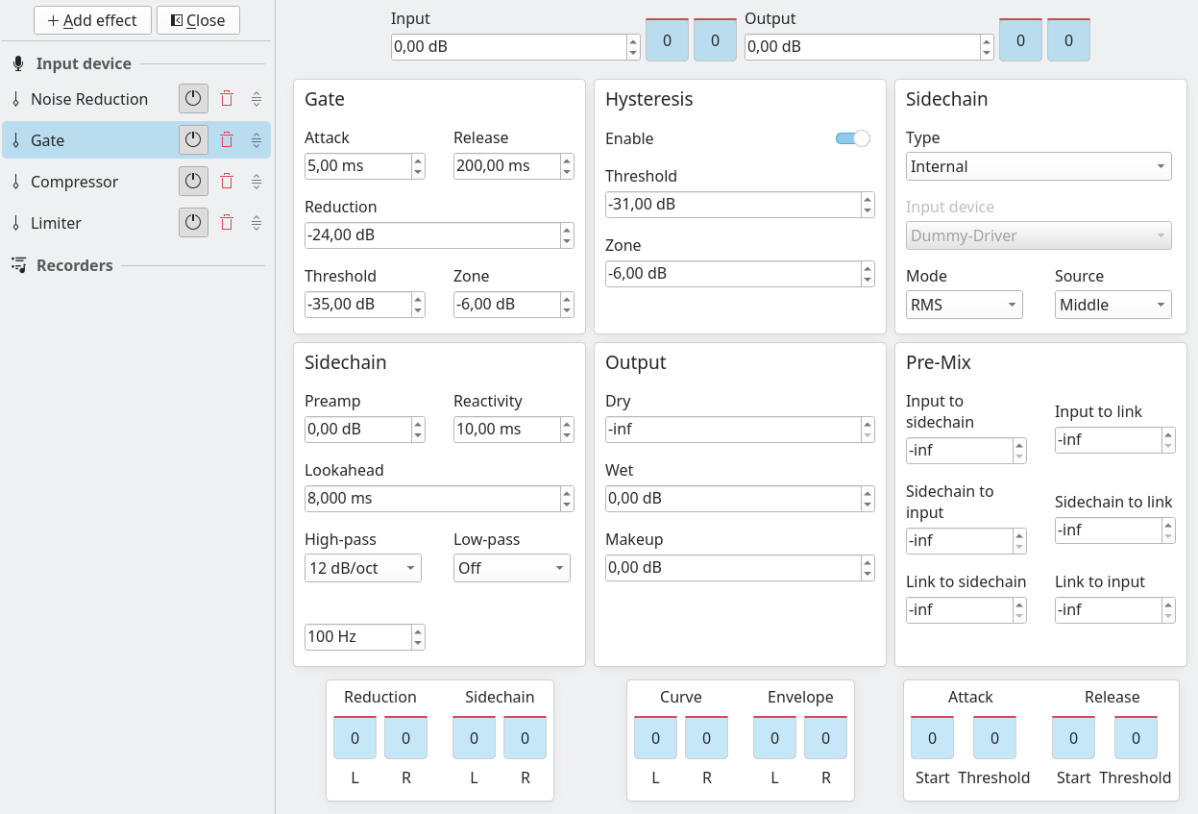
This Gate effect is used for silencing unwanted sounds. Since voice recognition did not perform as well as I wanted it to, I added this one on top of the first layer. Next follow the compressor and the limiter. The compressor reduces the difference between the loudest and quietest components of your audio, giving it a more uniform sound. The limiter serves as a ceiling for your audio signal, protecting the listener's ears from unpleasant peaks.


If you set the program up to start automatically, that's your always-on mic optimizer! What I get from this effect chain is a more loud and professional sound with reduced typing noise. This should allow me to get a crisp recording whenever I need to, without having to fix the audio as an afterthought. Another thing you can do in this program is saving your settings as a preset. This preset can then be autoloaded depending on which microphone you connect. This might come in handy since I sometimes use a laptop at another place without my Q9 mic.
The other piece of software that I have been getting into is Inkscape, which is a free vector graphics editor. My skills with it are still rough around the edges, as you can see in this post's thumbnail. But at this point I should be able to produce an okay looking logo or a more serious thumbnail, given enough time. It feels good to close some skill gaps and become a more well-rounded media person, since that lowers my reliance on things like stock photos. But there is still a long way to go.
Thanks for reading my blog!